Working with the builder
Use the conversation, app preview, code, and management views to review a change and decide what to do next.
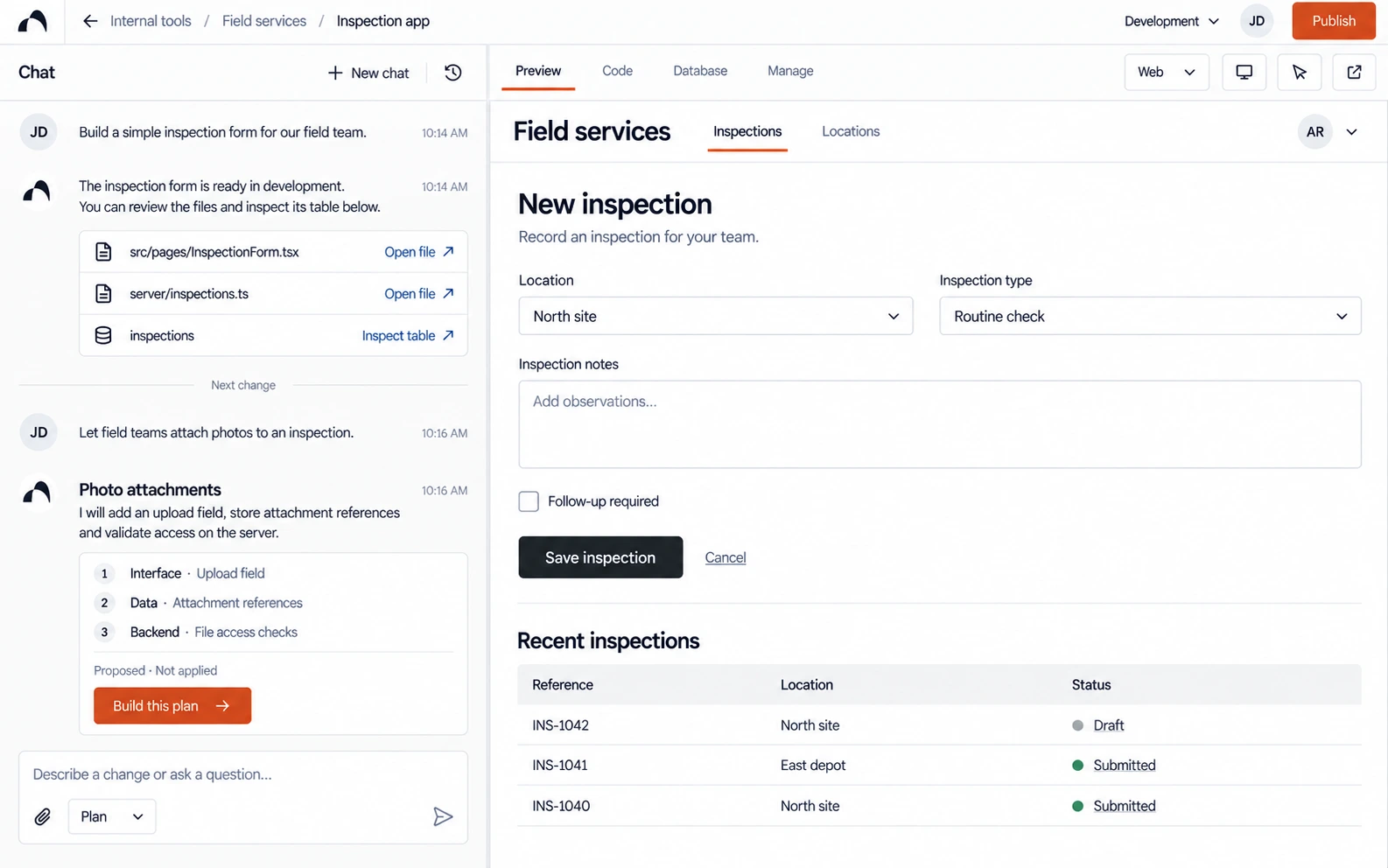
The builder keeps the conversation beside your app. Describe a change in Chat, wait for the round to finish, and review the affected journey.
Find the right view
| Question | Where to look |
|---|---|
| Does the app work for its users? | The app preview, including desktop and mobile sizes. |
| What code was generated? | Code, the read-only file browser. |
| What information does the app store? | The database or managed-backend area, with the intended environment selected. |
| What still needs an answer? | The conversation and planning records. |
| Which version changed? | App history and the completed build round. |
| Is this ready to release? | Publishing settings and the live address after release. |
Labels may vary as the builder evolves. The public illustration shows a product concept; use the controls available in your current workspace.
Ask for a focused change
Name the screen, what happens now, and what should happen instead. Use Plan to explore a change before modifying the app, or Build when the outcome is clear.
The preview may show the previous saved result while a build is running. Wait for the round to complete before judging the change.
Review before continuing
Test the affected flow, including its empty and error states. Inspect code or data when it answers a specific question.
If a round made the result worse, review history and undo before continuing. Publishing remains a separate action.
Next: Choose Plan or Build, browse code, or add saved data.